Home
 
Download
 
Buy now
 
Tech support


Tools
Tutorials
Extras
Screenshots
Articles
Links
ZAR 8.3 Manual
Zmeil 2.1 Manual
Zlon 1.0 Manual
Acronyms
Data recovery quiz
Checklists
News
Contacts


Related material:
Partition recovery


Home / Extras / Articles / LDM / Dynamic Disks basics


LDM / Dynamic Disks basics

Logical Disk Manager (LDM) overview

Windows 2000 and later versions use Logical Disk Manager (LDM) licensed from Veritas to perform hard disk partitioning. The disks partitioned using this new scheme are called "Dynamic", as opposed to the "Basic" disks partitioned using old-fashioned partition table (MBR). Microsoft implementation of LDM is somewhat restricted compared to the original implementation, but nonetheless allows implementation of
  • Spanned volumes
  • Simple stripe sets (RAID0)
  • Stripe sets with parity (RAID5), in server versions of Windows only.
  • Mirrored volumes (RAID1), in server versions of Windows only.


How is the volume information stored

LDM information is not stored in the hard disks' partition table (MBR), because of its size. The LDM database occupies the last megabyte of the physical disk instead. Additionally, a PRIVHEAD element pointing to the database is stored immediately following the MBR. To protect a dynamic volumes from legacy applications which are not aware of LDM layout and think that there is a free space where in fact it is used by dynamic volumes, a special entry is placed into MBR. One partition of type 0x42 occupying the entire disk is created and stored in MBR, as illustrated below.
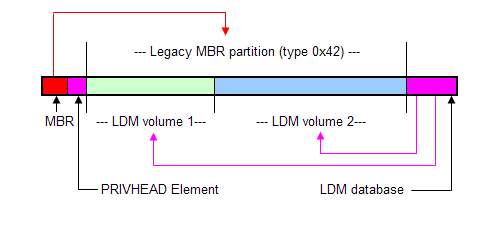
The LDM database may be quite complex. The four-level description (Volume-Component-Partition-Disk) is used to describe each volume to accumulate all possible RAID layouts. Because of fault tolerance requirements, LDM database is replicated across all physical disks in the machine. Should one of the disks fail, the whole database is still available and the fault-tolerant drives can be mounted even some of their member disks are missing.


Special notes

  • Each copy of LDM database holds information about all volumes and all physical drives belonging to this machine (this set of drives is called "Disk Group").

  • If you analyze a dynamic disk with ZAR, the resulting list of volumes will contain all the dynamic volumes available in the system (even those residing on the physical disks different from the one you selected) plus one legacy MBR/Primary partition describing the whole set of LDM-managed volumes.


Copyright © 2001-2008 Zero Assumption Recovery
[Data recovery forum]
There are currently 111 visitors browsing the site.


Special offers

Weekend discount in effect
3 hours 38 min left

Our customers say

I am not tech savy at all... which is how I somehow reformatted the disc in my digital camera on the last day of vacation, and lost all my photos and videos. I came across this download and gave it a try. [...] I did have to refer back to the demo for guidance on selecting the right "physical device". The selections it gave me were unrecognizable to me. The demo helped me understand what I was looking for. All pictures are recovered, and I am grateful! The movies were recovered as pictures (large jpeg files). I can't figure out how to convert them back to movies. Regardless, I am thrilled to have my pictures back.


Support forum
Latest topics
 
Sitemap